eHouse Home Automation system has relatively advanced control and management algorithms.
Like any such system design shouldn’t be based on assumptions on selected and supported functions developped and optimized by more than 10 years of experience and should be tested before instalation in the house for propper results.
Ehouse system functionality:
- Achieving the maximum functionality of the system Building Automation providing high viability of the system
- minimum price system in the comfort of versions , prestige , full
- open system that allows independent design , configurations , installations , software , etc. .
- Independence from expensive, dedicated components, eg (dedicated panels , devices with their own logic)
To break the myth of construction – design that:
- The first house built for the enemy
- the other for sale
- the third for himself
We provide demonstration and Evaluation module for:
- installers
- investors
- subcontractors
- designers
enabling:
- independent , optimal and error-free installation of smart home design , building automation and other control systems
- allows you to design a system eHouse , allowing maximum use of its functionality and hardware resources of microprocessor controllers ( Building Automation eHouse – Controllers )
- enables self-configuring system eHouse and empirical explanation for the differences between theory and practice
- allows you to configure and test the home automation system , on ” the table ” even before the construction or installation in buildings planing
- prior to test an electronic system will greatly increase your home ” satisfaction factor ” of the house after the introduction and will allow the elimination of unnecessary items
- to test the smart home system eHouse demonstration module will significantly decrease implementation to the production system in the home , building or apartment
- Obtaining the final configuration before “production start” eHouse system giving confidence that the system is working properly
- allows controllers to re-check in case of doubt
- provides a fully functional test environment eHouse system through the implementation based on a sample installation with connected actuators , temperature sensors , lighting sensors , LEDs attached to a digital output and PWM dimmers
- Allows you to fully test all system controllers eHouse 1 (RoomManager , HeatManager , ExternalManager) and the other a 5V power supply
The main functions of the module evaluation & demonstration of eHouse system home control :
- Demo module is made on the set of A4 which is a miniature of a building automation system and the whole system of total control of devices in homes and other types of construction
- lighting
- heating
- security system
- shutters , Marquis , gates , wickets
- recuperator , Boiler , central heating , ventilation , thermal energy
- Testing RoomManager ( home automation lighting control )
- digital inputs (12pcs) connected to the switches (push buttons)
- measurement input light level – connected to the light sensor
- 7 other inputs are connected to sensors measuring the temperature
- digital outputs connected to LEDs which indicate output states
- 3 dimmers PWM outputs connected to LEDs showing the level of lighting dimmer
- Configuration set in the software eHouse (* demo)
- Testing HeatManager ( heating control )
- Dedicated digital outputs for control of central heating , ventilation , recuperative , acquisition , etc. . Control home automation :
- boiler pump , fireplace , solar collectors , water heater , radiators , underfloor heating , Radiator
- Electro – three-way valve to the heater temperature control liquid , radiators or underfloor heating
- cylinder intake , ground heat exchanger , recuperator bypass
- blocking the boiler , fuel feeder
- intake fan support , GWC , fireplace , HAD (Distribution of hot air from the fireplace)
LEDs connected to
- Signaling and alarm outputs connected to LEDs allow to understand and test the control algorithms HeatManager
- fire alarm , Boiler , solar collectors
- DHW heating alarm and CO
- All measurement inputs (16) connected to temperature sensors (simulation and the temperature change can be achieved for example by means of drying)
- External Temperature PN
- External Temperature PD
- Internal Temperature (For Reference)
- Temperatures – Metering recuperator (all inputs and outputs)
- Supply air temperature for the ground heat exchanger
- The temperature of the water heater , against distributors for radiators or underfloor heating
- The temperature of the water jacket 2 sensors for safety
- Temperature Convection fireplace (for indication of operation and DGP)
- Storage tank temperature CO / DHW – 3 sensors (top , center , down)
- Boiler temperature
- The temperature of solar panel
- Dedicated digital outputs for control of central heating , ventilation , recuperative , acquisition , etc. . Control home automation :
- Testing ExternalManager ( control gates ) Or alternatively CommManager ( control of blinds, rollers drives )
- All driver outputs (Rolet , Marquis , Bram , Wickets , Blocked outlets , Sirens , Warnings) connected to the LEDs
- digital inputs (12pcs) connected to the switches (push button)
- measurement input light level – connected to the light sensor
- 7 other inputs are connected to sensors measuring the temperature
- 3 dimmers PWM outputs connected to LEDs showing the level of lighting dimmer
- Configuration set in the software eHouse (* demo Building Automation eHouse – Gallery of Software Control )
- Set of connected sockets for RS data bus – 485
- Set of connected sockets for power bus
Photo Module Demonstration: 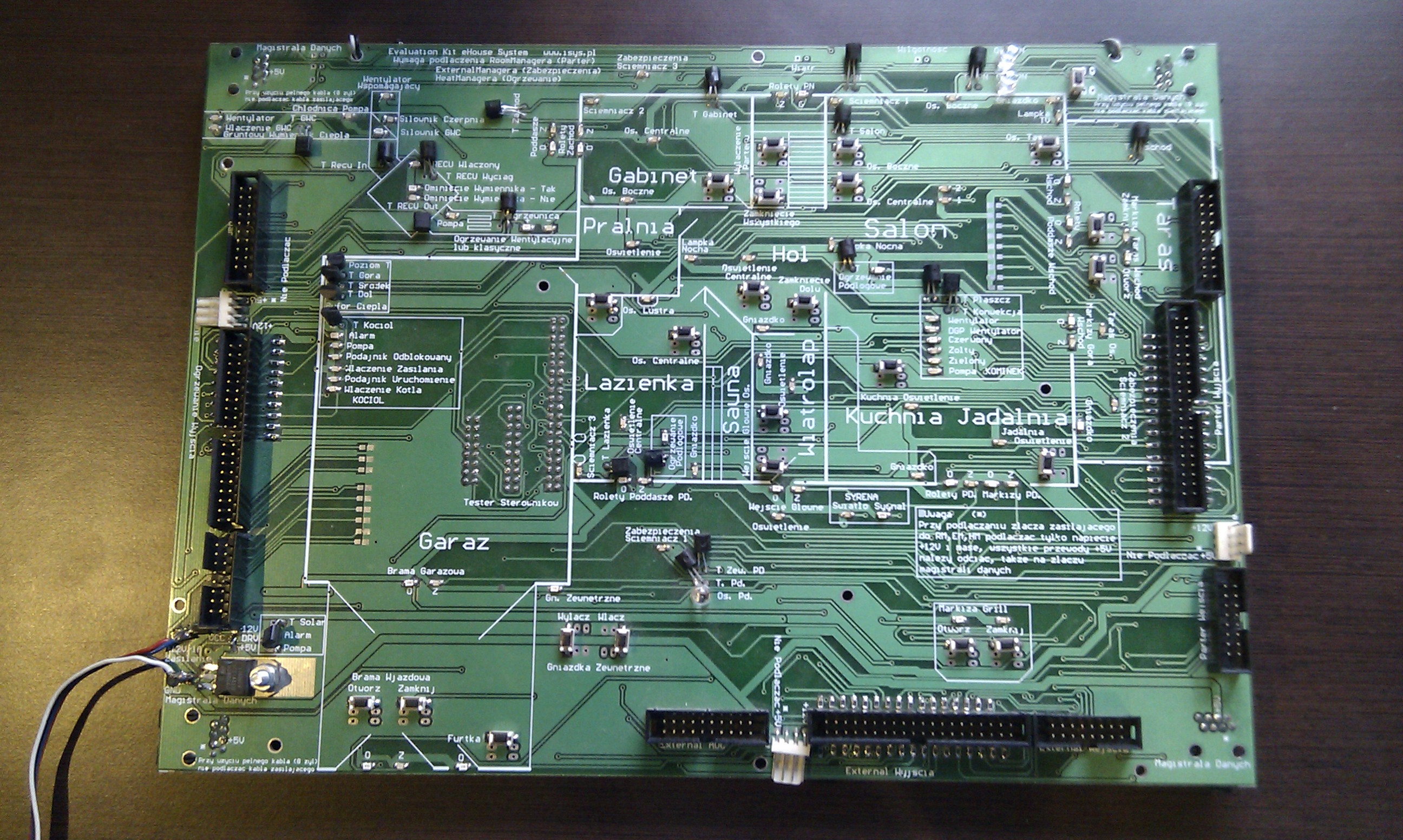 Magnification Module Demonstration The project was designed on the basis of the demonstration module (Evaluation) is configured in the application file eHouse samples . zip , which must be unpacked to the root of eHouse (so that all files were in directory ” %EHOUSE_DIR% / Samples / ” ) .
Applications run demo directory ” %EHOUSE_DIR% / Samples / bin / ” ( EHouse home automation – Software )
The module will enable and demonstrate users how to design a system using 100 % its capabilities ( Home Automation eHouse – Independent System Design ) And allow the installation of free of errors ( Building Automation eHouse – Self-Installation ) Do it yourself!
Find more:
Building Automation apartment house and the main features: Home Automation eHouse – Saving Ecology
scripts , Library Home Automation eHouse – Management system from the outside
Microprocessor System Automation Home , Flats Home Automation – Security , Alarm , Control of shutters